Violation Types Configuration
Violation types define the categories of rule violations and their associated fine structure. Setting up violation types correctly ensures consistent enforcement and helps residents understand the consequences of violations.
- Access to the Violations section of your property
- Familiarity with your HOA's governing documents (CC&Rs, bylaws) and rules
- Authority from your board to establish violation categories and fines
California Civil Code § 5850 sets limits on the amount of fines HOAs can assess. The maximum fine per violation typically depends on your community, but often does not exceed $100 per violation per day, with a cap on the total fine. Your violation types must comply with these limits.
Creating Violation Types
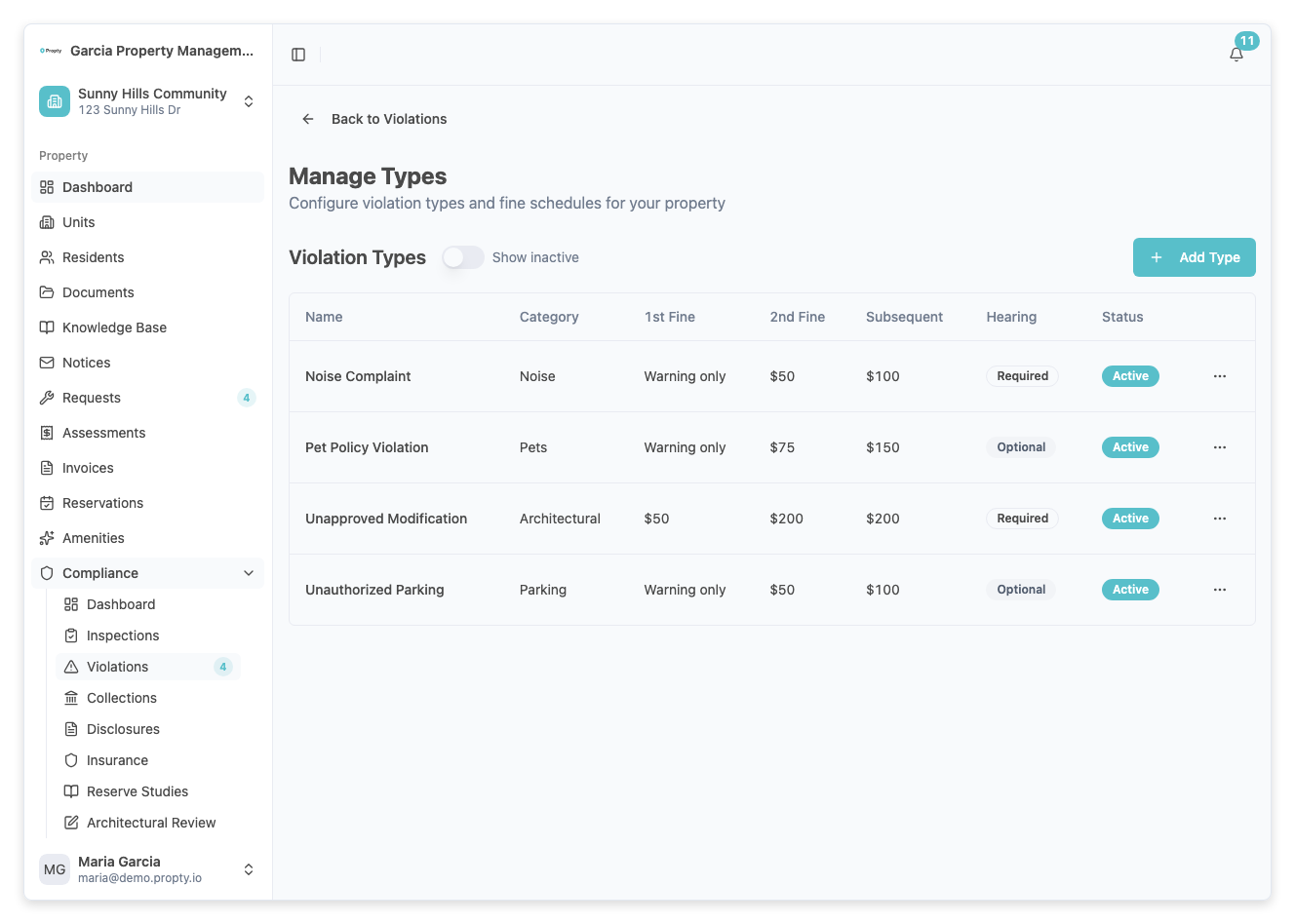
1. Go to the Violation Types page
From your property dashboard, click Compliance → Violations, then click Manage Types. This opens the violation types management page.
2. Click "Add Type"
Click the Add Type button. A form will appear.
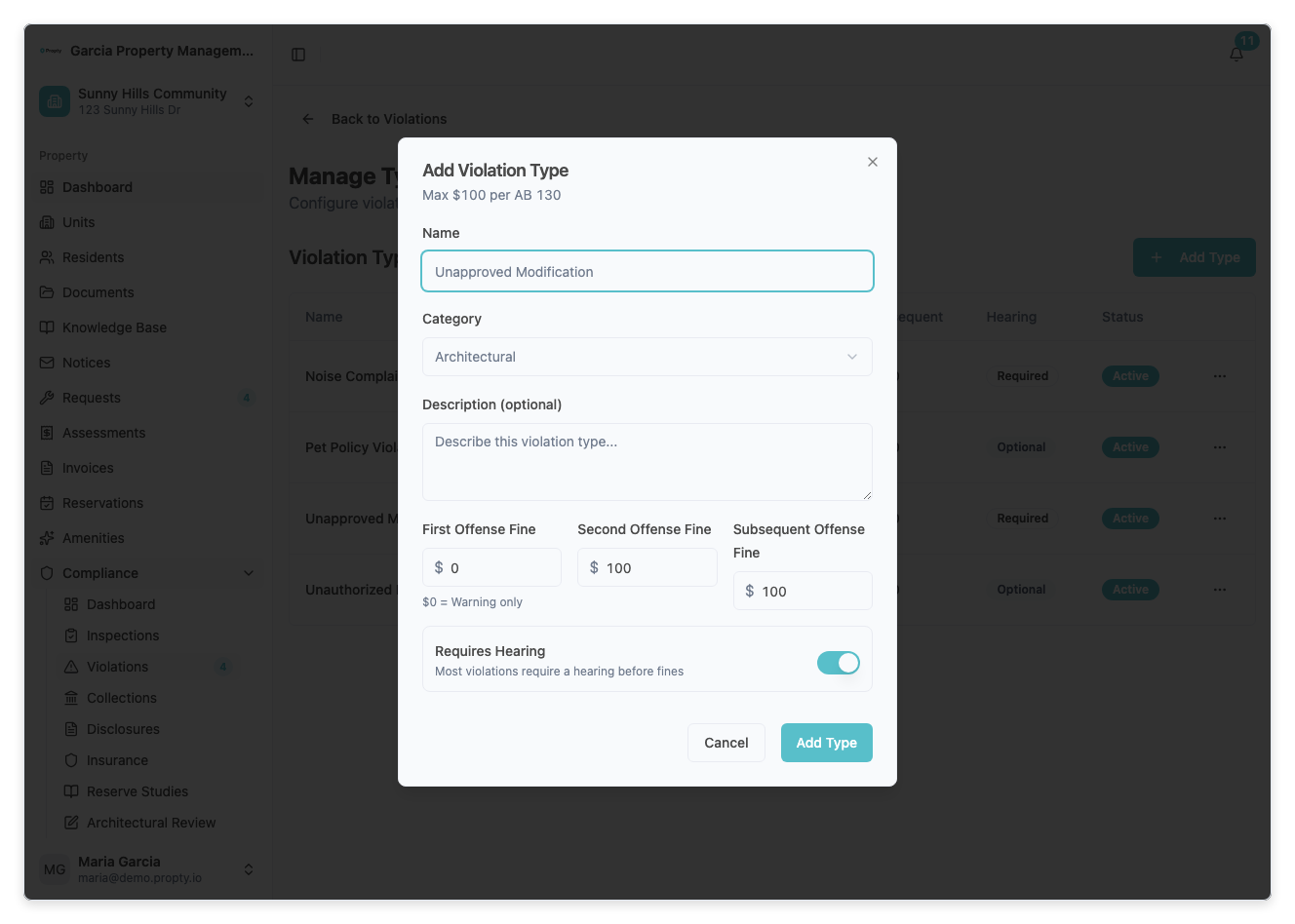
3. Enter violation type details
Fill in the following fields:
- Name (required) — The name of the violation category (for example, "Unauthorized Parking", "Noise Complaint", "Pet Policy Violation", "Exterior Modification").
- Category (required) — The type of violation: Property Maintenance, Architectural, Pet Policy, Parking, Noise, Other.
- Description (optional) — Additional details about what constitutes this violation.
- Requires Hearing — Toggle on if this violation type requires a formal Architectural Review Committee (ARC) or Hearing process before fines are assessed. Many violations require a hearing per California law or your CC&Rs.
4. Set the fine structure
Define fines for different offense counts:
- First Offense Fine — The fine for the first occurrence. This is often $0 (warning only) to give the resident a chance to correct the issue.
- Second Offense Fine — The fine if the violation repeats within a set period (for example, $50).
- Subsequent Offense Fine — The fine for any violations after the second (for example, $100 per violation).
A common structure is: First offense = $0 (warning), Second = $50, Subsequent = $100. This gives residents time to correct the issue while escalating fines for repeated violations.
5. Check maximum fine limits
Propty validates each fine against the maximum fine allowed for your property. This is configured in the property's Settings page under the Compliance Settings card. Make sure every offense-tier fine complies with this limit.
6. Save the violation type
Click Save. The violation type is now available when you create new violations.
Violation Type Fields
| Field | Required | Notes |
|---|---|---|
| Name | Yes | Be specific (e.g., "Trash Can Left Out" not just "Trash") |
| Category | Yes | Choose the most relevant category for organization |
| Description | No | Helpful for staff reference; can clarify what qualifies as this violation |
| Requires Hearing | No | Toggle on if California law or your CC&Rs require a hearing before fines |
| First Offense Fine | Yes | Often $0 for a warning-only violation |
| Second Offense Fine | Yes | Increased from the first offense |
| Subsequent Offense Fine | Yes | Highest tier; applied to all violations after the second |
Understanding the Hearing Requirement
Some violations require a formal hearing before the resident can be fined. This is required by:
- California Civil Code § 5855 (Architectural Review hearings)
- Your specific CC&Rs or bylaws
- Board policy
How the hearing requirement affects violations
When you create a violation of a type that "Requires Hearing":
- The violation starts in Pending Hearing status.
- An Internal Dispute Resolution (IDR) process begins, or a hearing is scheduled.
- The resident has the right to be heard before fines are assessed.
- Only after the hearing is completed can you assess fines.
Violations that don't require a hearing can be issued with fines immediately (subject to any other notice requirements).
Managing Violation Types
Editing an existing violation type
- Go to Compliance → Violations and click Manage Types.
- Click on the violation type in the list.
- Update any fields and click Save.
Changes apply to new violations going forward. Existing violations keep their original fine amounts.
Deactivating a violation type
If a violation type is no longer used:
- Go to Compliance → Violations and click Manage Types.
- Open the action menu for the violation type.
- Click Deactivate.
Effect:
- Existing violations of this type remain in the system unchanged.
- You can no longer create new violations of this type.
- The violation type no longer appears in the dropdown when issuing new violations.
Violation Type Categories
Choose the category that best fits each violation type:
| Category | Examples |
|---|---|
| Property Maintenance | Unkempt landscaping, trash cans left out, exterior deterioration, graffiti |
| Architectural | Unauthorized modifications, paint color, signage, window coverings |
| Pet Policy | Dogs off-leash, aggressive pets, unauthorized animals |
| Parking | Unauthorized parking, guest parking abuse, vehicle maintenance in lot |
| Noise | Excessive noise, barking, loud music, construction hours violation |
| Other | Miscellaneous violations that don't fit above categories |
Configuring Maximum Fine Limits
To set the property-wide maximum fine:
- Open the property's Settings page.
- Find Maximum Violation Fine.
- Enter the maximum amount a single violation can be (for example, $100).
- Click Save.
This maximum applies to all violations at the property and helps ensure compliance with California law.
Best Practices
- Define clear violation types. Create types that match your rules exactly. Vague categories lead to inconsistent enforcement.
- Establish a fine schedule. Work with your board to agree on fines before creating violation types. Document the decision.
- Include a warning tier. Most violation types should have a $0 fine for the first offense, giving residents a chance to correct.
- Align with your CC&Rs. Make sure your violation types and hearing requirements match your governing documents.
- Review annually. Each year, review your violation types to ensure they're still relevant and fines are reasonable.
- Document the board vote. When creating or updating violation types, record the board vote authorizing the fines.
Troubleshooting
I can't add a new violation type
- Make sure you have Admin access to your property.
- Manage Types is only available to users who can administer the selected property.
A violation type I'm trying to add already exists
- Use the search function on the Settings page to check for duplicates.
- Consider editing the existing type instead of creating a new one.
I set a fine amount but Propty says it exceeds the maximum
- Your property has a maximum violation fine limit. Reduce the individual violation fine or increase the property maximum (if your board approves).
- To change the property maximum, open the property's Settings page and update Compliance Settings → Maximum Violation Fine.
Residents are complaining that fines are unfair
- Review your fine structure. Compare it to similar HOAs and California law.
- Work with your board to consider:
- Increasing the warning period (more violations before higher fines kick in)
- Lowering fine amounts
- Offering a correction period before fines apply
Can I change the fine amounts for violations already issued?
- No. Once a violation is issued, its fine amount is locked to ensure fairness.
- You can edit violation types going forward, but existing violations keep their original fines.
- If a resident disputes a fine, work with your board on a decision to reduce or waive it.