Understanding Your Assessments
As a property owner, you are responsible for paying regular assessments (HOA dues) and any special assessments approved by the board. Propty makes it easy to see what you owe, when it's due, and how to stay current.
What Are Assessments?
Assessments are the fees collected from unit owners to fund the operation and maintenance of your community. They typically cover shared expenses like landscaping, insurance, building maintenance, reserves, and management fees.
There are two main types:
| Type | Description |
|---|---|
| Regular assessments | Recurring dues charged monthly, quarterly, or annually — set by the board during budget approval |
| Special assessments | One-time or limited charges for unexpected expenses like major repairs, legal fees, or reserve shortfalls |
Viewing Your Assessments
1. Check your balance
Log in to the portal at app.propty.io and click Account. At the top of the page you will see:
- Balance — The total amount you currently owe across all open invoices
- Next due — The title and due date of your next upcoming invoice
If your balance is $0, a green Paid up badge is displayed.
2. Review your invoice history
On the same Account page, the Invoice History table shows all invoices issued to your unit:
| Column | What it shows |
|---|---|
| Description | The name of the charge (e.g., "Q1 2026 HOA Assessment") |
| Due Date | When payment is due |
| Amount | The total charge |
| Status | Open, Paid, or Overdue |
Click any row to see the full invoice details.
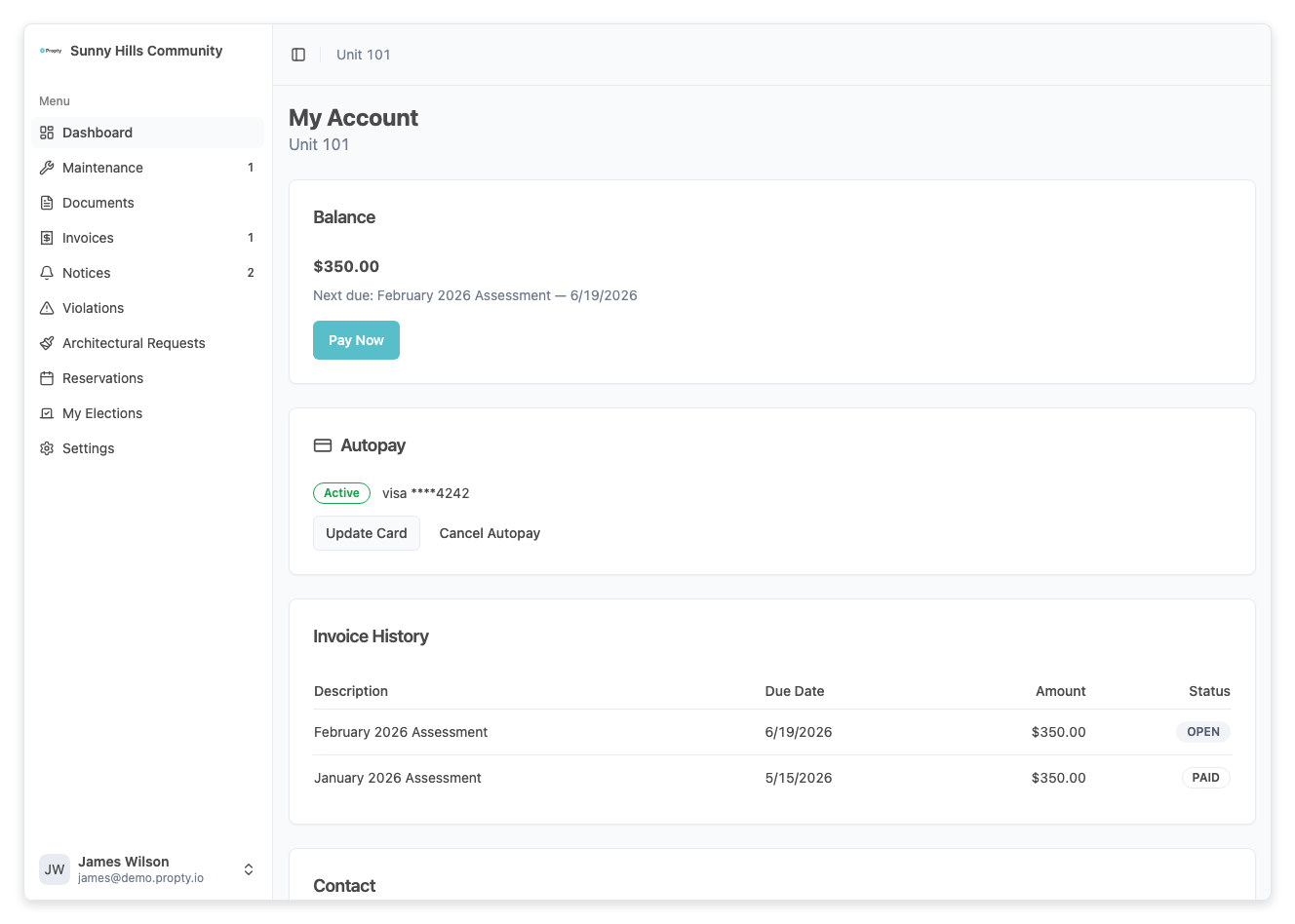
For a full walkthrough, see View Your Invoices.
3. Understand invoice statuses
| Status | What it means |
|---|---|
| Open | The invoice is due and waiting for your payment |
| Paid | Fully paid — no action needed |
| Overdue | The due date has passed and you still have an outstanding balance |
Overdue assessments may incur late fees, interest, or other penalties as defined by your HOA's governing documents. Pay promptly or set up autopay to avoid this.
Assessment Schedules
Your property manager sets the assessment schedule when creating invoices. Common patterns include:
- Monthly — Dues invoiced on the 1st of each month
- Quarterly — Dues invoiced at the start of each quarter (Jan, Apr, Jul, Oct)
- Annually — A single invoice for the full year
Your specific schedule depends on your HOA's policies. Check with your property manager or review the description on your invoices for details.
Special Assessments
From time to time, the board may approve a special assessment to cover an expense not included in the regular budget — such as a roof replacement, elevator repair, or legal matter.
Special assessments appear in your invoice list alongside regular assessments. They will typically have a descriptive title indicating the purpose (e.g., "Special Assessment — Roof Repair Fund").
If you have questions about a special assessment, attend your next board meeting or contact your property manager. The board is required to communicate the reason for any special assessment to all owners.
Staying Current on Assessments
The easiest way to stay current is to set up autopay. With autopay enabled, Propty automatically charges your saved payment method when each invoice is due.
- See Making Payments for all payment options
- See Set Up Autopay for autopay instructions
Troubleshooting
I don't see any invoices
- Your property manager may not have published invoices for your unit yet. Check back later or ask your property manager.
An assessment amount seems wrong
- Contact your property manager. Have your invoice number ready. Assessment amounts are set by the board and published by management — only they can adjust them.
I was charged a late fee
- Late fees are applied automatically based on your property's rules. If you believe the fee is in error, contact your property manager. To avoid future late fees, consider setting up autopay.
I don't understand a special assessment
- Review the invoice description for details. For more information, contact your property manager or review the board meeting minutes where the special assessment was approved.