Viewing Reports
As a property owner, you can review your personal financial history through the resident portal. If you also serve on the HOA board and have dashboard access, you can view property-wide financial reports including the aging report.
Your Personal Financial View
Account Summary
From the resident portal, click Account to see your personal financial snapshot:
- Current balance — The total you owe across all open invoices
- Next due invoice — The title and due date of your upcoming charge
- Invoice history — A complete list of every invoice issued to your unit, with amounts and statuses
This gives you a quick overview of where you stand financially with your HOA.
Invoice History
The invoice history table on your Account page shows every invoice ever issued to your unit:
| Column | What it shows |
|---|---|
| Description | Invoice title (e.g., "Q1 2026 HOA Assessment") |
| Due Date | When payment was or is due |
| Amount | The total charge |
| Status | Paid, Open, or Overdue |
Click any invoice to see the full detail, including payment history and remaining balance.
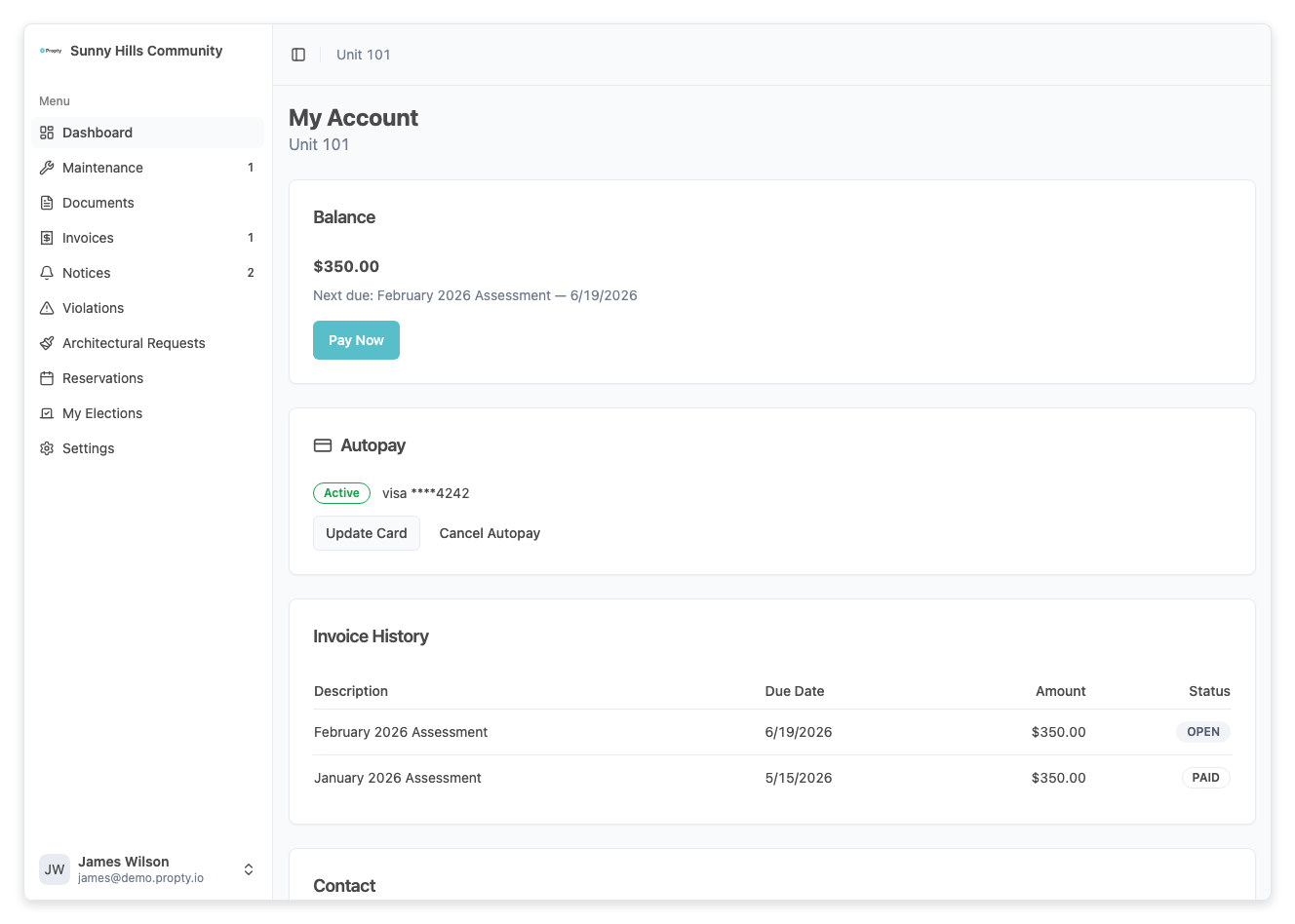
See View Your Invoices for a full walkthrough.
Payment History per Invoice
Each invoice has its own Payment History section showing every payment recorded against it:
- Date — When the payment was made
- Method — Card type and last 4 digits, or bank transfer
- Amount — How much was paid
- Status — Succeeded, Pending, or Failed
This is useful for confirming payments went through or reconciling your personal records.
Board Member Reports
If you serve on the board and have access to the management dashboard, you have visibility into property-wide financial data. These reports help the board monitor the financial health of the community.
Aging Report
The aging report shows all overdue invoices across the property, grouped by how long they have been past due:
| Bucket | Meaning |
|---|---|
| 0–30 days | Recently overdue |
| 31–60 days | Moderately overdue |
| 61–90 days | Significantly overdue |
| 90+ days | Severely overdue |
Each bucket shows the total dollar amount and number of invoices. You can:
- Click a bucket card to filter the table to that range
- Sort by unit, balance, or days overdue
- Click any row to see the full invoice detail
The aging report helps the board identify delinquent accounts and prioritize follow-up.
For full details on the aging report, see View Aging Report.
Invoice Overview
From the dashboard, board members can view all invoices across the property — not just their own. This includes:
- Total amounts invoiced and collected
- Outstanding balances by unit
- Invoice statuses across the community
If you need dashboard access for board duties, ask your property manager to grant you the appropriate permissions. Dashboard access is separate from your resident portal login.
Using Reports for Board Decisions
Financial reports in Propty help the board:
- Monitor collections — Identify units with overdue balances before they become long-term delinquencies
- Track payment trends — See whether owners are paying on time or if collection issues are growing
- Prepare for meetings — Review the aging report before board meetings to discuss financial health
- Support budget planning — Use historical invoice and payment data to inform next year's assessment amounts
Troubleshooting
I don't see any reports on the dashboard
- You may not have dashboard access. Ask your property manager to grant board-level permissions.
The aging report shows no data
- There may be no overdue invoices at your property. Invoices only appear on the aging report after their due date has passed.
My personal balance doesn't match what I expected
- Check your invoice history for any invoices you may have missed. Recent payments may take a moment to reflect (especially ACH transfers, which take 3–5 business days).
- Contact your property manager if you believe there is a discrepancy.