Integrations
Propty integrates with best-in-class third-party services to handle payments, email delivery, SMS notifications, video meetings, AI services, and file storage. Most integrations are configured once and then work automatically.
- Organization Manager access (for organization-level integrations like Stripe and ClickMeeting)
- Property Admin access (for property-level integrations like OpenAI and email services)
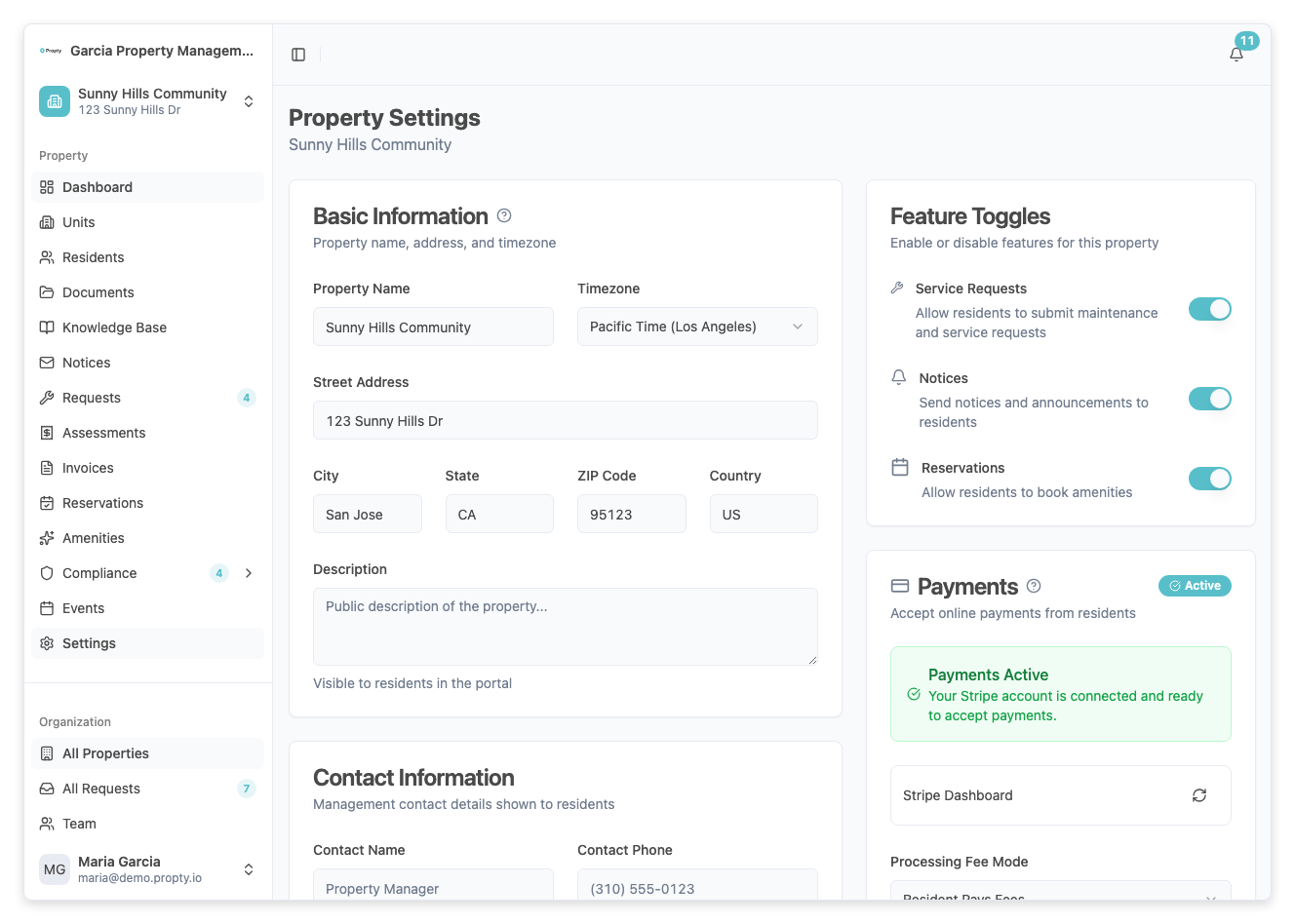
Stripe — Payment Processing
Stripe processes all online payments from residents, including bank transfers (ACH) and credit/debit cards. Stripe is PCI-compliant and Propty never handles sensitive payment data.
Setup
Setup required: Yes — one Stripe account per property (or share across properties)
How to connect:
- Go to Settings → Property Settings → Payments.
- Click Connect with Stripe.
- You'll be redirected to Stripe. Log in or create a Stripe account.
- Authorize Propty to access your Stripe account.
- Confirm your bank account for payouts.
- Return to Propty — connection is complete.
What it does
- Processes resident payments securely
- Supports ACH bank transfers and credit/debit cards
- Automatically deposits funds to your bank account
- Provides transaction history and reporting
- Configurable service fee handling (you can pass to resident or absorb)
Managing Stripe
- View payments dashboard: Go to Settings → Property Settings → Payments → Open Dashboard.
- Disconnect Stripe: Click Reconnect if Stripe becomes disconnected. You'll re-authenticate with Stripe.
- Bank payouts: Manage payout schedule and bank account in your Stripe dashboard.
Status indicator
On the Payments settings page, you'll see a status badge:
- Connected — Stripe is active and ready to process payments
- Disconnected — Stripe connection needs to be re-established; click Reconnect
Resend — Email Delivery
Resend powers all outbound emails: invoice notifications, portal invitations, maintenance request updates, notices, and community communications.
Setup
Setup required: No — works automatically once Propty is configured
Email sources:
- Transactional emails from Propty come from
noreply@propty.ioand your organization name - Residents reply to these emails, but responses go to your property manager contact
What it does
- Delivers invoices and payment notifications
- Sends portal invitations and password resets
- Notifies residents about service requests
- Sends official notices (violations, disclosures, etc.)
- Supports English, French, and Spanish based on resident language preference
- Tracks delivery status (delivered, bounced, open rates)
Monitoring email delivery
View the delivery status of each email on the notice or invoice detail page:
- Sent — Email has been queued for delivery
- Delivered — Email received by the recipient's mail server
- Bounced — Email was rejected (invalid address, full inbox, etc.)
- Opened — Recipient opened the email
Troubleshooting email issues
- Emails not received? Check spam/junk folders. Verify the resident's email address is correct.
- Email bounced? The email address may be invalid. Update the resident's contact info and resend.
- Delivery delayed? Propty typically sends emails within minutes. Check Resend status on the detail page.
Twilio — SMS Delivery
Twilio delivers SMS (text message) notifications to residents who opt into SMS communications.
Setup
Setup required: No — SMS is configured at the organization level and works automatically
Opt-in requirement: Residents must explicitly opt into SMS through the resident portal. Propty logs all SMS consent for TCPA compliance.
What it does
- Sends SMS notifications about invoices, requests, and notices
- Tracks SMS consent and delivery status
- Maintains TCPA compliance records (consent date, timestamp, source)
SMS consent tracking
As a manager, you can see each resident's SMS status:
- Go to Residents and click the resident name.
- In the Communication section, check SMS Consent.
- You'll see:
- Status: Opted In or Not Opted In
- Consent Date: When they opted in
- Consent Source: Portal, Manual, etc.
Important: Managers cannot grant SMS consent
Residents must opt in themselves. This is a TCPA (Telephone Consumer Protection Act) requirement. You cannot enable SMS on behalf of a resident, even with permission. Residents must:
- Log into the resident portal
- Go to Account Settings → Communication Preferences
- Enter their phone number and check the SMS consent box
- Save
ClickMeeting — Virtual Meetings
ClickMeeting provides video conferencing for HOA meetings and elections. Once connected, all new events can use ClickMeeting for virtual attendance.
Setup
Setup required: Yes — one-time organization-level connection
How to connect:
- Go to Settings → Organization → Integrations.
- Find ClickMeeting and click Connect.
- Log into your ClickMeeting account (create one if needed).
- Authorize Propty to create meetings in ClickMeeting.
- Return to Propty — connection is complete.
What it does
- Enables virtual attendance at HOA meetings and elections
- Automatically records meetings for future reference
- Provides participant access links to share with residents
- Manages breakout rooms for breakout sessions or discussions
- Records and archives meetings
Using ClickMeeting for events
When you create a new meeting or election:
- On the event creation form, find the Video Conference option.
- Toggle on Enable ClickMeeting.
- Configure:
- Meeting title
- Duration
- Start time
- Recording preferences
- Once the meeting is created, a ClickMeeting meeting room is generated.
- Share the meeting link with residents so they can attend virtually.
- After the meeting, recordings are automatically pulled into Propty.
Managing recordings
- Recordings are stored in Propty for 90 days by default
- You can download recordings for board archives
- Share recordings with residents or the board as needed
OpenAI — AI Request Triage
OpenAI powers Propty's AI request triage and Knowledge Base features. When an inbound resident email creates a request, Propty can classify the message, query the property's Knowledge Base, and create a staff-only draft reply when confidence is high enough.
Setup
Setup required: Yes — configure the Knowledge Base for each property
How to prepare:
- Go to the property Knowledge Base page.
- Add current governing documents, rules, FAQs, and operational procedures.
- Confirm the sources show Completed indexing status.
- Use the Activity tab to review AI triage outcomes.
What it does
- Classifies inbound email requests as informational or maintenance-related
- Queries the Knowledge Base for property-specific answers
- Creates staff-only draft replies for high-confidence informational requests
- Records triage outcomes in the Knowledge Base Activity tab
Privacy & data handling
- Limited request context: Propty sends only the content needed to classify and answer the resident's request
- Encrypted transmission: Data is sent over encrypted connections
- Staff review: AI-created replies are internal drafts until staff sends a response
- Property-scoped knowledge: Each property has its own Knowledge Base sources
Using AI triage results
- Resident emails a question: "Can I bring two guests to the pool this weekend?"
- Propty classifies it as an informational request.
- Propty queries the Knowledge Base for pool rules and guest policies.
- If confidence is high enough, Propty adds a staff-only draft reply to the request timeline.
- Staff reviews the draft and sends an edited or approved response to the resident.
Google Cloud Storage — File Storage
All file uploads in Propty (documents, attachments, photos, lease PDFs) are stored securely in Google Cloud Storage.
Setup
Setup required: No — this is managed by Propty automatically
What it does
- Stores all user-uploaded files securely
- Encrypts files at rest
- Provides access controls (only authorized users can view files)
- Handles backups and disaster recovery
File management
- Upload limits: Files must be under 50 MB
- Supported formats: PDF, JPG, PNG, SVG, DOCX, XLSX
- Retention: Files are kept as long as the record they're attached to exists
- Deletion: When you delete a record with attachments, files are permanently deleted
Integration Workflow Example
Here's how these integrations work together in a typical HOA workflow:
- Admin publishes an invoice → Stored in Propty database
- Resend (email) sends notification → Resident receives invoice email
- Resident logs into portal → Sees invoice and clicks Pay Now
- Stripe (payment) processes payment → Resident enters card/bank info securely
- Stripe confirms payment → Propty updates invoice status to Paid
- Resend (email) sends confirmation → Resident receives payment receipt email
- Stripe deposits funds → Money arrives in your bank account per payout schedule
All automatically, with zero manual steps.
Security & Compliance
All integrations follow strict security standards:
- Stripe: PCI-DSS Level 1 compliant. Payment card data never touches Propty's servers.
- Resend/Twilio: HIPAA-compliant. Email and SMS are encrypted in transit and at rest.
- ClickMeeting: SOC 2 compliant. Video sessions are encrypted and securely recorded.
- OpenAI: Data is not retained; only the request description is processed.
- Google Cloud Storage: HIPAA, SOC 2, and ISO 27001 compliant. Files are encrypted and access-controlled.
Troubleshooting
| Problem | Solution |
|---|---|
| Stripe not connected | Go to Settings → Property Settings → Payments and click Reconnect. |
| Emails not being received | Check spam/junk folder. Verify resident email is correct. Check delivery status on the invoice/notice detail page. |
| SMS not sending | Verify the resident has opted into SMS in their portal settings. Check TCPA consent is recorded. |
| ClickMeeting meeting won't start | Check that your ClickMeeting account is active. Verify meeting start time hasn't passed. Refresh your browser. |
| AI triage drafts seem wrong | Update the property's Knowledge Base with clearer policies, remove outdated entries, and review the Activity tab to see whether confidence is low or sources are missing. |
| File upload fails | Ensure file is under 50 MB and is a supported format (PDF, JPG, PNG, SVG, DOCX, XLSX). |
| Want to add a new integration | Contact support with your request. We actively evaluate new integration partners based on community feedback. |