Proxy Voting and Mandates
Proxy voting allows a property owner to appoint a representative to vote on their behalf during an election or member vote. Under California Civil Code §5130, this is a valid voting method when properly documented.
- Access to the Events section
- The participant's name and contact information
- The representative's (proxy holder's) name and contact information
- The participant must be registered in the event
Civil Code §5130 permits a member to vote by proxy, provided the proxy is in writing and signed by the member who is entitled to vote. The proxy must be specific to the election or vote and cannot be transferred or voted on after the event.
Setting a Proxy: Two Methods
Method 1: Resident Submission During Pre-Meeting Check-In
Residents can designate a representative during the pre-meeting check-in (preboard) process:
- Resident receives the preboard invitation email with a secure link
- Resident clicks the link and navigates to
/preboard/[token] - On the preboard page, they have the option to Designate a Representative
- Resident enters the representative's name and email address
- The proxy is recorded and the resident confirms their participation
This method creates a digital record of the proxy appointment and notifies the representative.
Method 2: Manager Entry in Participants Tab
As a property manager, you can manually enter a proxy for a participant:
- Navigate to Events in the sidebar
- Click the event where you want to set the proxy
- Click the Participants tab
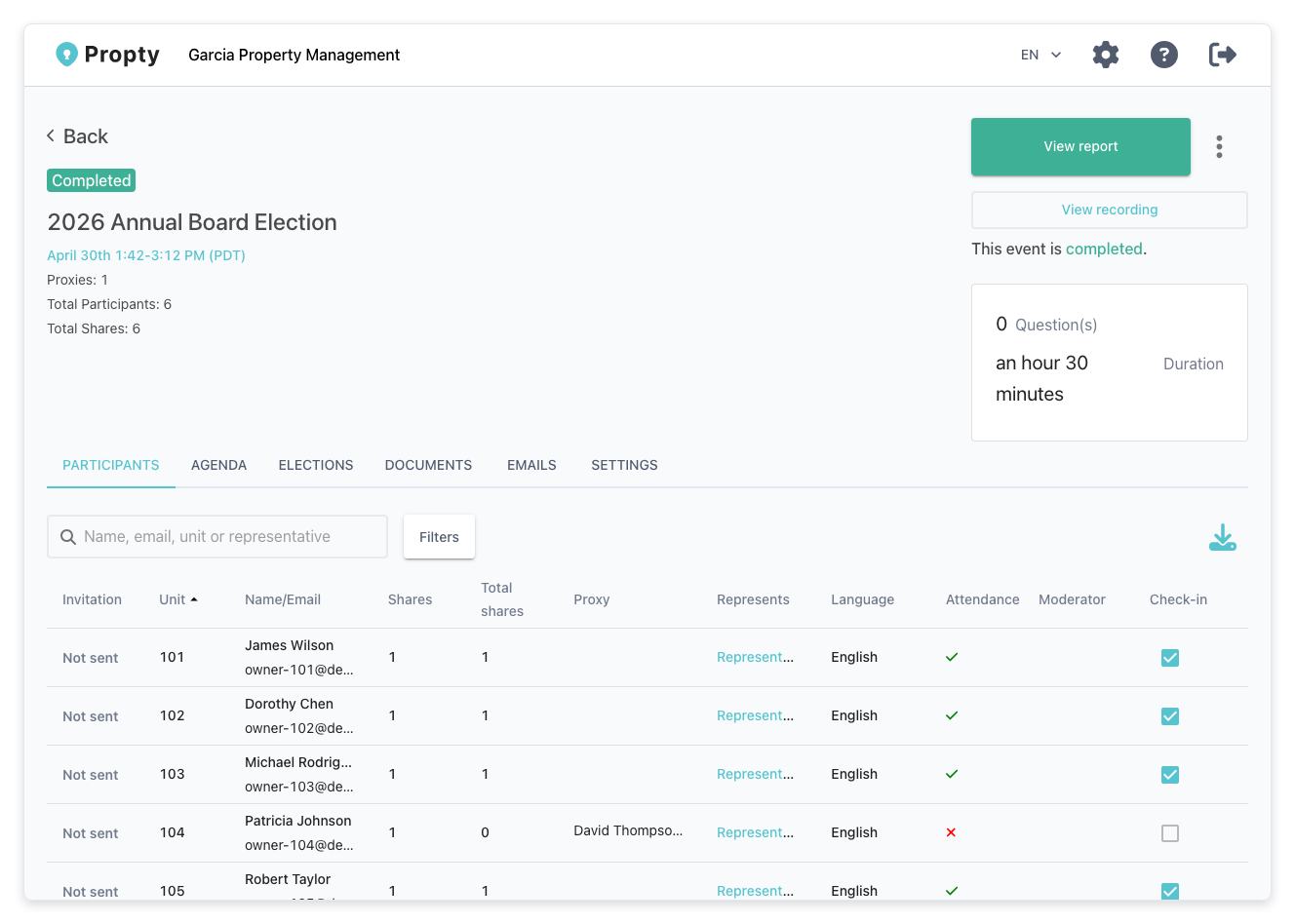
- Find the participant in the list
- Click the participant row or click Set Proxy/Mandate button
- Enter the representative's:
- Name: Full name of the proxy holder
- Contact Info: Email or phone number
- Click Save Proxy
Understanding Mandate Badges
Once a proxy is set, the participant displays a Mandate badge next to their name in the Participants list. This badge indicates they are voting through a representative rather than in person.
| Badge Status | Meaning |
|---|---|
| Mandate | A proxy has been designated for this participant |
| (No badge) | Participant is voting directly (no proxy) |
Downloading the Mandate Document
After a proxy is set, you can download a PDF record of the proxy appointment for your records:
- Open the event → Participants tab
- Click the participant with the Mandate badge
- Click Download Mandate to save the proxy document as a PDF
This document serves as proof of the proxy appointment for compliance purposes.
During the Live Event
When voting begins, the representative (proxy holder) checks in as a participant:
- The representative receives a check-in link or arrives at the meeting
- They check in using their own identity
- During the live event, they vote on behalf of the owner
- Their vote is recorded under the owner's name in the ballot, not the representative's
The polling interface displays the mandate holder's name so voters and poll workers can confirm the proxy relationship.
Revoking or Changing a Proxy
If you need to remove or change a proxy before the vote:
- Open the event → Participants tab
- Find the participant with the proxy
- Click Remove Proxy or Edit Proxy
- Confirm the change
Once voting has begun, proxies cannot be changed. If a conflict arises, contact the Inspector of Elections.
Proxy Voting Rules and Compliance
Keep these important rules in mind:
- Proxy must be in writing: Digital records in Propty satisfy this requirement
- Proxy is specific to one election: A proxy cannot be transferred to a different vote or future election
- Proxy holder must be authorized: The representative must be a member or authorized party (check your CC&Rs)
- One proxy per vote: A participant can only appoint one representative per ballot
- Proxy cannot be voted twice: If an owner votes directly and also via proxy, the direct vote takes precedence and the proxy is invalidated
Always maintain a record of proxy appointments. Propty automatically stores these in the event, and you can download mandate documents for compliance audits or disputes.
Next Steps
- Pre-Meeting Check-In (Preboard) — let residents designate proxies online before the meeting
- Voter Management and Weighted Voting — manage participant voting rights and power